Log in
WhatsApp Business using Clientify

25 clicks
¡Widget Test automated!
sss
25 clicks
¡Widget Test automated!
sss
25 clicks
¡Widget Test automated!
sss
25 clicks
¡Widget Test automated!
sss
25 clicks
¡Widget Test automated!
sss
25 clicks
¡Widget Test automated!
sss
24 clicks
¡Widget Test automated!
sss
24 clicks
¡Widget Test automated!
sss
24 clicks
Me uno al Grupo
Grupo de alumnos de A&C
Education
24 clicks
¡Widget Test automated!
sss
24 clicks
¡Widget Test automated!
sss
24 clicks
¡Widget Test automated!
sss
Previous
1
…
28
29
30
31
(current)
32
33
34
…
55
Next
Add the widget on your website
1. Copy this code
Your widget code
Copy code
Copied to clipboard
or your Key Number (
Learn how to add your Widget to your Wordpress website
)
Copy key number
Copied to clipboard
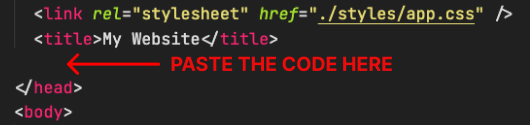
2. Paste the code
Place the code just before the </head> tag in the HTML of your website